Clone or heal?
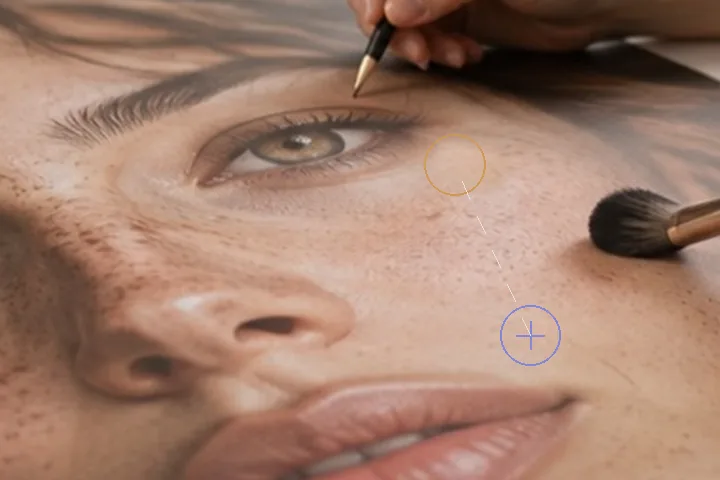
The heal brush is usually the better choice on skin: it samples a ring around the mark and transplants texture onto the destination’s own tone, so there is no seam. Clone copies texture and tone together from exactly where you point it. That is what you want for a stray hair across a cheek, a mark on a collar, or a scratch the heal brush keeps matching to the wrong thing — and what you do not want for a spot on a gradient, where the heal brush wins.
Pick a source the same brightness as the place you will paint. The first stroke after picking fixes the offset, and every later stroke keeps it, so the source walks with the brush.
- Source
- Alt-click, Pick source, or long press
- Offset
- fixed by the first stroke, kept after
- Blend
- soft footprint, size · hardness · flow
- Key
- S
What this mode runs on
What it will not do
- It is built for small marks on a face. Large objects, people or text in a background need a different kind of tool; this brush will repeat itself.
- It copies tone with texture. Clone from a darker area and the patch will be darker; heal is tone-matched, clone is not.
- It does not fill from nothing. It needs a source in the picture.
What people ask
How do I set the source on a phone?
Press Pick source in the Clone panel, then tap the skin to copy from. Then paint.
Why does the patch look repeated?
Clone copies exactly what is under the source. Pick a different source, lower the flow, or use the heal brush, which samples a ring and matches tone.
Can I remove something in the background?
For a small mark, yes. For a person or an object, no: this desk is built for marks on a face, and a clone stamp across a large area repeats visibly.
Is my photo uploaded?
No. Cloning happens in this tab.
Read next
- Spots and blemishesOpens with the heal brush in hand and the region already over the face.
- Remove a distraction behind the subjectCombine subject protection, local fill and careful edge review for background cleanup.
- The retoucherEvery layer at zero, and a face finder that will place the working region for you.
- How far is too farWhere the caps sit, why they are there, and what the distance readout is measuring.
- Why nothing here reshapes a faceThe one exclusion that is a decision rather than a boundary, and the reasoning behind it.