When to use this page
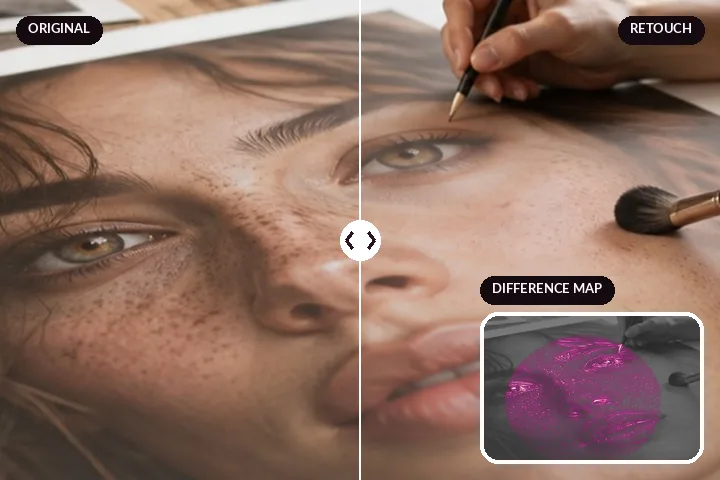
You have two files: the photo as it came off the camera or phone, and a version someone retouched — a studio, an app, a friend, or you on this site. You want to know what was done and how much. This page lines them up and shows the difference four ways, with nothing to edit and nothing to undo.
If you want to retouch a photo rather than inspect one, the retoucher has the same split view on its desk, and its “moved from source” figure is the one measured here.
- Input
- two photos: the original, then the retouch
- Alignment
- one size; centre crop when the shapes differ
- Views
- split · retouch · original held · difference map
- Figures
- moved from source · changed area · largest change · colour shift
- Download
- difference map as PNG
Reading the difference map
The original is shown in quiet grey and every change is painted over it in warm colour: the brighter the colour, the larger the change. Spot healing shows as small blobs, skin smoothing as soft patches across the cheeks and forehead, a red-eye fix as two dots, and a frame-wide colour or exposure change as an even wash. Raise the gain to see faint changes; save the map as a PNG to keep it.
What it will not do
- It needs both files. It does not judge a single photo or say whether a picture has been edited.
- It does not grade a retouch. The figures say how much moved, not whether it looks good or natural.
- It does not name reshaping. A warp shows as bright outlines in the map; the figures do not call it out.
- A re-save counts as a change. JPG compression moves pixels a little everywhere, which raises the changed-area figure.
What people ask
Are my photos uploaded?
What does "moved from source" mean?
Can it tell whether a photo was retouched if I only have one file?
Why is the whole picture marked as changed?
Does it detect face reshaping?
What if the two photos are different sizes?
Read next
- The retoucherEvery layer at zero, and a face finder that will place the working region for you.
- How far is too farWhere the caps sit, why they are there, and what the distance readout is measuring.
- Skin-tone testEvery layer measured for hue and chroma drift across nine synthetic skin tones, failures included.
- Why nothing here reshapes a faceThe one exclusion that is a decision rather than a boundary, and the reasoning behind it.